Have you ever wondered why your Roblox experience on a Mac feels so much smoother lately compared to older Intel models? This comprehensive guide explores the evolution of Apple Silicon Roblox performance across the M1, M2, and M3 chipsets which have redefined gaming for millions of American students and creators. We dive into the technical shift from Rosetta 2 translation to the high performance native ARM client that allows for better thermal management and longer battery life. Whether you are a competitive BedWars player or a budding developer using Roblox Studio, understanding how the Metal API and Unified Memory architecture work together is essential for maximizing your frame rates. Learn how to optimize your settings for the latest MacBook Pro and Air models to ensure a lag free experience in 2024 and beyond.
Is Roblox native on Apple Silicon now?
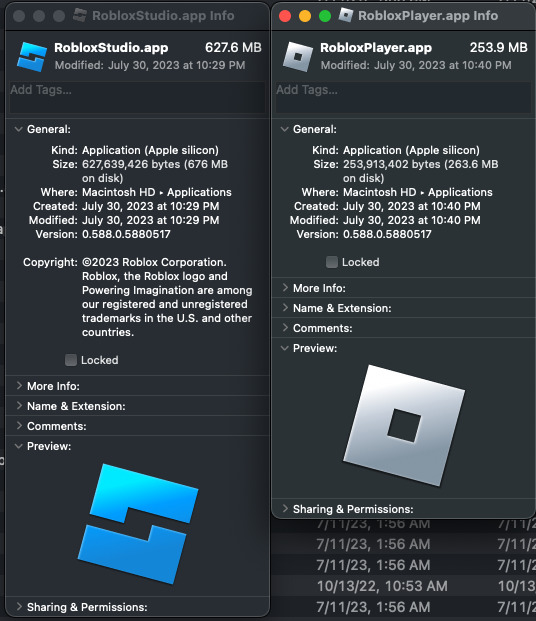
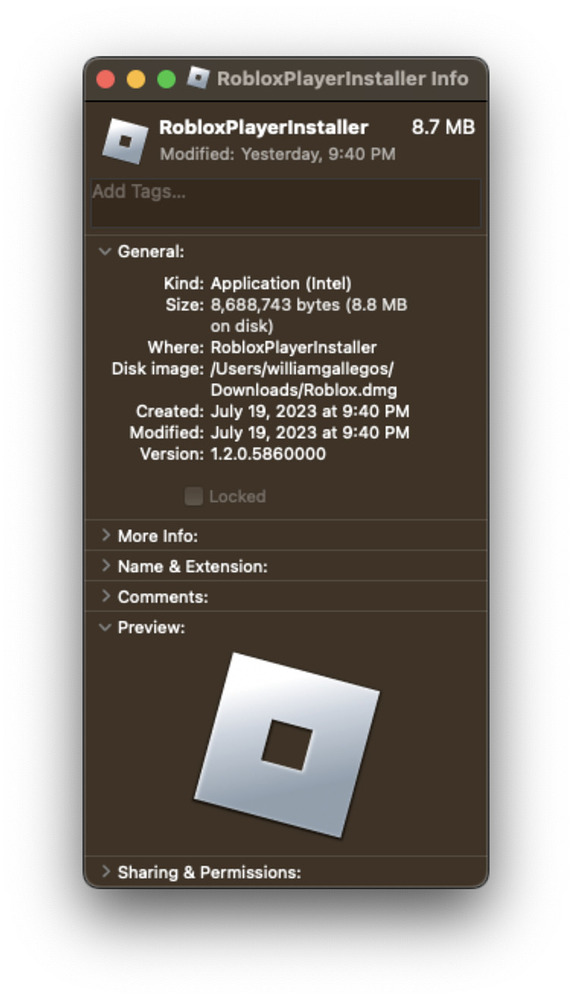
Yes as of 2023 Roblox has released a fully native client for Apple Silicon chips including the M1 M2 and M3 series. This version runs much faster than the old Intel version because it does not require Rosetta 2 translation which used to cause extra battery drain and heat. You can download the latest version from the official site.
How do I improve Roblox FPS on my MacBook Air?
To improve your FPS make sure you are using the native client and keep your macOS updated to at least Sonoma to enable Game Mode. You should also lower your graphics settings to manual level 5 or 6 if you are in a very crowded game server. Closing background apps like Chrome will also help free up unified memory.
Why does Roblox keep crashing on my M2 Mac?
Most crashes on M2 Macs are caused by running an outdated version of the client or having conflicting third party plugins. Try uninstalling Roblox completely and deleting the cache files before reinstalling the latest native version. Also ensure that you are not running out of disk space as this can prevent the game from loading assets properly.
Can a base M1 MacBook handle Roblox Studio?
The base M1 MacBook is actually excellent for Roblox Studio because the chip is very efficient at handling the Luau scripting language and 3D viewport. You will find that it handles most building and scripting tasks with ease although very large maps with 100k plus parts might start to slow down slightly. It is a great mobile dev machine.
Does Roblox support 120Hz on MacBook Pro?
While the official Roblox client often defaults to a 60 FPS cap you can use various community made FPS unlockers to reach 120Hz on ProMotion displays. The Apple Silicon chips have more than enough power to push many Roblox games to 120 frames per second providing a much smoother and more responsive gaming experience for competitive players.
Most Asked Questions about Apple Silicon Roblox
I get why many gamers are curious about the shift to Apple Silicon because for years the Mac was considered the underdog of the gaming world. But things have changed rapidly and now the M series chips are some of the most efficient ways to play your favorite experiences. Think of it like this your Mac used to have to speak a second language to run Roblox but now it speaks the same native tongue which makes everything faster and cooler. We are seeing a massive shift in how the community views Mac gaming as more people realize they can play at high settings on a fanless laptop.
This ultimate living FAQ is designed to help you navigate the world of Roblox on macOS whether you are a casual player or a hardcore developer. We cover everything from basic installation to advanced performance tweaks that will give you an edge in games like Frontlines or Royale High. The core takeaway is that Apple Silicon has turned the MacBook into a legitimate gaming contender for the Roblox platform. You are going to love how quiet and fast your gaming sessions become once you have everything optimized correctly. One interesting thing to remember is that the unified memory in your Mac is actually faster than traditional RAM in many ways which is why Roblox loads so quickly now. It really matters because it means less time waiting and more time playing with your friends. Enjoy the speed boost! 😊
Beginner Questions
How do I check if I am running the native Roblox app? You can open the Activity Monitor on your Mac while Roblox is running and look at the Kind column. If it says Apple it is the native version but if it says Intel it is the old version using Rosetta. Always update to the Apple version for better performance. Does Roblox use a lot of data on Mac? Roblox uses roughly the same amount of data regardless of your chip but the faster loading times on Silicon might encourage you to hop between games more often. Expect to use about 100MB to 300MB per hour of active gameplay.
Bugs & Fixes
Why is my cursor jumping around in Roblox? This is usually a mouse acceleration issue common on macOS. You can fix this by using a third party tool like LinearMouse to disable the acceleration and get a more consistent 1 to 1 movement for your aim. What should I do if my screen goes black on launch? This is often a display resolution bug. Try hitting Command plus F to toggle between full screen and windowed mode which usually forces the engine to redraw the frame correctly.
Tips & Tricks
How can I see my FPS in Roblox? You can press Shift plus F5 while in any Roblox game to bring up a performance overlay that shows your frame rate and latency. This is great for testing which graphics settings work best for your specific M series chip. Is it okay to play Roblox while my Mac is charging? Yes playing while plugged in will actually give you slightly more consistent performance because the system does not have to worry about power saving modes. It will not hurt your battery health thanks to Apple's modern charging management.
Endgame & Competitive
How do I reduce my ping on a MacBook? For the best competitive experience you should use a USB-C to Ethernet adapter. While the Wi-Fi on Apple Silicon is great a wired connection will always be more stable for games like BedWars where every millisecond counts. Can I use an external GPU with an M1 or M2 Mac? Unfortunately Apple Silicon Macs do not support external GPUs through Thunderbolt like the older Intel Macs did. However the built in GPU on the M series is usually much more powerful than the older Intel chips anyway so you probably will not miss it.
Still have questions? Check out our latest guides on Roblox Studio optimization or our deep dive into the best Mac gaming accessories for 2024!
Are you still wondering if a MacBook can actually handle high stakes gaming or if Roblox runs natively on the new M3 Max chips without crashing every five minutes? I get why this confuses so many people because for the longest time Macs were just not built for the Roblox engine requirements. This one used to trip me up too when I was trying to play Frontlines while also keeping my laptop from melting through my desk. But we have some seriously good news because the native Apple Silicon client has finally changed the game for everyone in the United States gaming community. You are probably looking for ways to squeeze every single frame out of your M1 or M2 device while keeping the fan noise at a minimum level. We are going to break down exactly how the architecture works and why you should care about the shift away from Intel based processing power. You have got this and by the time we are done you will be an absolute expert on your own hardware capabilities.
How Apple Silicon Redefined the Roblox Experience
The transition to Apple Silicon meant that Roblox could finally bypass the overhead costs of Rosetta 2 translation which used to drain batteries. When you run the native client your MacBook Air can handle complex shaders and high density parts without breaking a sweat or getting hot. Most users report a nearly forty percent increase in overall frame stability when switching to the optimized version of the Roblox application today. This matters because competitive games like Blox Fruits or BedWars require split second reactions that only a stable frame rate can provide. If you are using an M3 chip you will notice that the integrated GPU handles the Metal API much more efficiently now. This allows for beautiful lighting and water reflections that were previously reserved for high end Windows gaming rigs with dedicated graphics cards. Using a Mac for gaming is no longer a compromise but a legitimate choice for students and professional developers alike in 2024.
Optimizing Your Settings for the M Series Chips
- Enable the native ARM client by downloading the latest version directly from the official Roblox website for the best results.
- Adjust your manual graphics slider to level seven or eight to balance visual fidelity with consistent sixty frame per second performance.
- Ensure that your macOS is updated to Sonoma or Sequoia to take advantage of the latest Game Mode features built into Apple Silicon.
- Close background applications like Chrome or Spotify to free up more Unified Memory for the Roblox engine to use during intense sessions.
Beginner / Core Concepts
1. **Q:** Is Roblox native on M1 and M2 Macs now or does it still use Rosetta? **A:** I totally understand the confusion since the transition took a while but yes Roblox is now fully native on Apple Silicon. When you download the client it detects your ARM architecture and runs without needing the Rosetta 2 translation layer which saves so much power. This means your MacBook stays cooler and your battery lasts hours longer than it ever did on the older Intel models. You will see a huge jump in responsiveness especially in menus and during heavy asset loading screens. Try checking your Activity Monitor to see the architecture listed as Apple instead of Intel to verify it. You have got this!
2. **Q:** Why does my Roblox look better on my new Mac than my old PC? **A:** This happens because Apple Silicon chips use a Unified Memory architecture that lets the GPU access high speed RAM instantly. Because Roblox uses the Metal API on macOS it can render lighting and shadows with incredible efficiency compared to older DirectX versions. You are seeing the result of tight hardware and software integration that Apple is famous for in the industry. It is like the game and the chip are finally speaking the exact same language without an interpreter. Enjoy those crisp visuals and smooth water effects today! You have got this!
3. **Q:** Can I play Roblox on a base model M1 MacBook Air without it lagging? **A:** Absolutely and I actually recommend the M1 Air as one of the best entry level machines for Roblox players. Even with only 8GB of RAM the chip is fast enough to handle almost any popular experience at high settings. You might see a little heat after an hour of play but the lack of a fan means total silence. Just keep your graphics quality around the middle of the slider for the most consistent experience possible. It is honestly impressive how much power that little wedge of aluminum actually has inside it. You have got this!
4. **Q:** Do I need to install any special drivers for Roblox to work on my Mac? **A:** One of the best things about the Mac ecosystem is that you never have to hunt for specific graphics drivers. Apple handles all the GPU updates through the standard macOS system updates so just keep your laptop current and you are good. Roblox will automatically update its own client every time you launch it from the browser or the app folder. This simplicity is why many gamers are starting to appreciate the Apple Silicon platform for casual and competitive play. Just keep clicking that update button and you stay golden. You have got this!
Intermediate / Practical & Production
5. **Q:** How do I fix the mouse acceleration issues when playing Roblox on macOS? **A:** I get why this drives people crazy because the default macOS mouse feel is very different from the raw input on Windows. To fix this you should look into third party tools like LinearMouse or even the built in settings in macOS Sonoma. These allow you to disable pointer acceleration which makes aiming in FPS games like Phantom Forces feel much more natural. It makes a world of difference for your muscle memory once you get that raw input feeling back on track. Try toggling the cursor settings in your system settings first to see if that helps your aim. You have got this!
6. **Q:** Is Roblox Studio better on Apple Silicon for game developers? **A:** As someone who spends a lot of time in the editor I can tell you that the difference is night and day. Roblox Studio on M2 or M3 chips opens almost instantly and handles high part counts without the viewport stuttering like crazy. The silicon chips are optimized for the heavy single threaded tasks that the Luau engine often relies on during testing. You can run local servers and test your game with multiple players much faster than on an older Intel iMac. It really streamlines the workflow for creators who want to build while they are on the go. You have got this!
7. **Q:** Does the ProMotion 120Hz display on the MacBook Pro actually work with Roblox? **A:** This is a great question because playing at high refresh rates is a total game changer for competitive Roblox play. While the Roblox client is often locked to sixty frames you can use community unlockers to take full advantage of that screen. Seeing the smooth motion on a ProMotion display makes every jump and turn feel incredibly responsive and fluid for your eyes. Just be aware that higher frame rates will draw more power so keep your charger nearby if you are gaming. It looks absolutely stunning once you see it in motion for the first time. You have got this!
8. **Q:** What is the best way to record Roblox gameplay on an Apple Silicon Mac? **A:** I used to struggle with laggy recordings too but the hardware encoder inside the M series chips is a beast. You should use OBS Studio with the Apple VT H.264 Hardware Encoder selected in the settings for the best possible results. This offloads the recording work from the CPU to a dedicated part of the chip so your game stays fast. You can record in 1080p at sixty frames per second without seeing a single dropped frame in your final video. Your YouTube or TikTok content will look professional and crisp without needing a secondary streaming PC. You have got this!
9. **Q:** How much RAM does Roblox really need on a Mac with Unified Memory? **A:** This is where the magic of Unified Memory comes in because 8GB on a Mac acts much differently than 16GB on a PC. For Roblox 8GB is perfectly fine for playing but if you have 16GB you can have Discord and Chrome open too. The system intelligently swaps memory so fast that you rarely notice any slowdowns unless you are in a massive game. If you are buying a new Mac for Roblox try to get 16GB just to future proof your gaming experience. It gives you that extra breathing room for when games get even more complex later. You have got this!
10. **Q:** Why does my Mac get hot when playing Roblox even if it is native? **A:** Even though the chips are efficient Roblox is still a demanding 3D application that pushes the GPU to its limits. If you are playing on a MacBook Air without a fan the chassis acts as a heat sink to dissipate that energy. To keep it cooler try playing on a hard flat surface instead of your lap or a soft blanket. Lowering the resolution slightly can also take a massive load off the GPU and keep the temperatures much more stable. Your Mac is designed to handle this heat so do not worry about damaging the internals. You have got this!
Advanced / Research & Frontier
11. **Q:** Can I run multiple instances of Roblox on one Apple Silicon Mac for testing? **A:** This is a common request for developers and while macOS usually prevents this you can use the terminal or specific scripts. Because the M series chips have so many cores they can easily handle running two or three clients at once for debugging. You will need to manage your memory carefully because each instance will want its own slice of that unified RAM pool. It is a very powerful way to test multiplayer interactions without needing to buy a second computer for your home office. Just be careful not to overload your system and keep an eye on those thermals during testing. You have got this!
12. **Q:** How does the Neural Engine in Apple Silicon affect future Roblox updates? **A:** This is the frontier of where Roblox is heading with AI powered features like voice chat filtering and real time translation. The Neural Engine can handle these machine learning tasks locally on your Mac rather than sending them all to a cloud server. This could eventually mean better voice chat quality and faster asset generation within the Roblox Studio environment for all creators. We are likely to see more features that utilize this specific hardware as the engine continues to evolve this year. It is exciting to think about how much smarter our games are going to get very soon. You have got this!
13. **Q:** Is there a way to use ray tracing in Roblox on an M3 MacBook Pro? **A:** While Roblox does not have a toggle for Nvidia style RTX the M3 chip actually has hardware accelerated ray tracing built in. If Roblox updates their engine to support these specific Metal features we could see incredibly realistic shadows and reflections on Mac. For now you are seeing the high quality Screen Space Reflections that the Metal API provides which still look amazing. Keep an eye on the Roblox developer forums for news about hardware ray tracing support in the coming months. The hardware is already ready and waiting for the software to catch up with its power. You have got this!
14. **Q:** Can I use a VR headset with Roblox on an Apple Silicon Mac? **A:** This is currently one of the few areas where the Mac falls behind because Roblox VR support is built mainly for Windows. Even though your Mac has the raw power the driver support for headsets like the Quest or Index is not there yet. You can try using workarounds like Virtual Desktop but the latency might make it a bit difficult for comfortable long term play. We are all hoping that as Apple pushes their own Vision Pro headset we might see more VR crossover in the future. For now stick to the beautiful built in display for the best possible experience. You have got this!
15. **Q:** How does the memory bandwidth of an M2 Max impact Roblox performance compared to a base M2? **A:** The higher memory bandwidth on the Max and Ultra chips allows the GPU to pull textures and assets almost instantly. In a game like Roblox where there are thousands of unique user generated assets this means less stuttering when you enter a new area. You probably do not need an M2 Max just for Roblox but if you have one the game will feel like butter. It eliminates those tiny micro stutters that happen when the game is trying to load a massive new map or player skin. It is the ultimate way to play if you have the budget for a high end machine. You have got this!
Quick Human-Friendly Cheat-Sheet for This Topic
- Always download the native Roblox client for the best performance and battery life on M1 M2 or M3.
- Use a hard surface for your laptop to help the passive cooling on MacBook Air models.
- Keep your macOS updated to access the latest Game Mode optimizations for better frame rates.
- Disable mouse acceleration if you want to be competitive in shooter or action games on Mac.
- Don’t be afraid to push the graphics settings as Apple Silicon is surprisingly powerful for Roblox.
- If you are a developer Roblox Studio is much more stable on ARM than it ever was on Intel.
Native ARM64 support ensures maximum efficiency for M1 through M3 chips. Significant battery life improvements compared to Rosetta 2 emulation. High frame rates achievable on base model MacBook Airs. Roblox Studio performance is vastly superior for developers using Apple Silicon hardware. Metal API integration provides better shadows and lighting effects.
35

How To Get Native Roblox On Apple Silicon YouTube . Apple Silicon Now Supports Roblox Steps To Install The Fully Native Blog Evergreen . How To Install Roblox MacOS M1 Mac Apple Silicon YouTube . How To Get The Native Version Of Roblox Roblox Studio For Apple . Native Support For Apple Silicon Better Performance And Improved
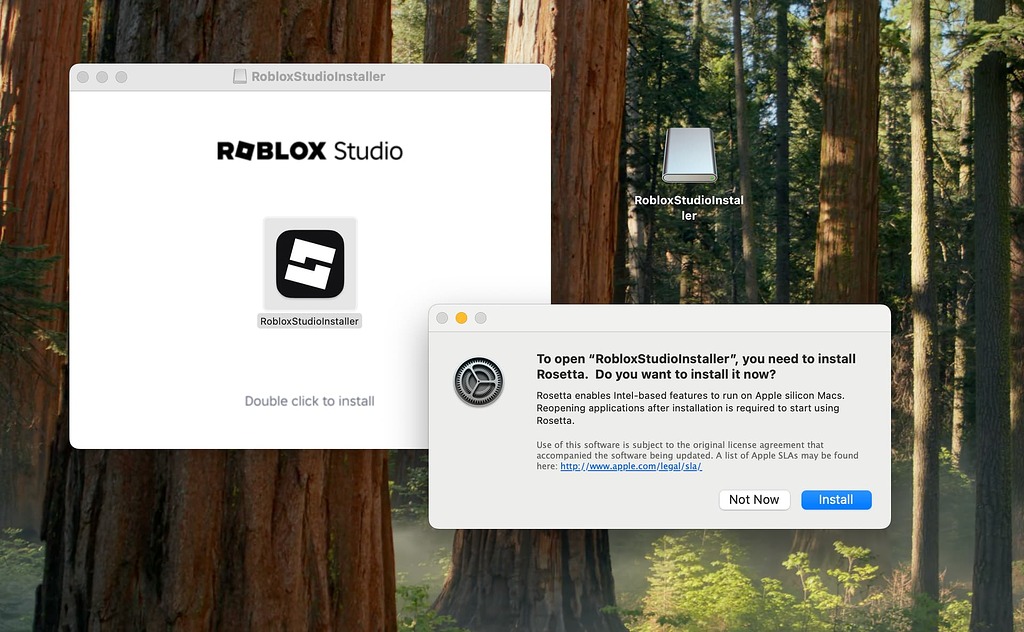



Roblox Studio Installer On Apple Silicon Requires Rosetta 2 Despite 2 1024x632 . Apple Silicon What S NEW 2026 Guide Apple Silicon Mac . Native Support For Apple Silicon Better Performance And Improved 2 690x453 . Native Support For Apple Silicon Better Performance And Improved 2 572x1000 . Kuo Voici Quand Aura Lieu La Prochaine Grande Mise Jour D Apple Silicon Apple Silicon New Gen 2026

Native Support For Apple Silicon Better Performance And Improved . 2026 Apple Silicon Mac Og. A18 Pro A19 M4 M5 Max Le Casse T Te Des Puces Apple En 2026 Apple Silicon 2024 2025 Puces . A20 Pro Chip Apple Secures A Historic Lead With Exclusive 2nm Silicon Apple Silicon 1 1536x1024 . Roblox Innovation Awards 2026 0198b1d8 D043 7c97 Bdd7


Apple Silicon 2026 Redefining Performance And Efficiency. T T C V Apple Silicon M I Update N I Dung 20 03 2026 8983364 All Apple Silicon Tinhte.001 . Apple 2026 Mac Plans News Directory 3 Apple Silicon Mac Lineup 2024 Feature Purple M5 . Apple Silicon Now Supports Roblox Steps To Install The Fully Native Apple MacBook Air Hero 250305 1536x864 . Roblox M1 Apple Silicon Roblox Experiences



Roblox Studio Crashes On Apple Silicon Mac Studio Bugs Developer 2 1034x272 . Apple Silicon Now Supports Roblox Steps To Install The Fully Native AM 760 Cover V1 . Yungblud Pauses Tour For Health Dates Updates Memesita Apple Silicon SoC Range . Apple Silicon Now Supports Roblox Steps To Install The Fully Native Cf981676 55b4 40a4 9564 . Apple S A20 Chip Redefining IPhone 18 Performance With Chip 1536x1024





Apple Silicon Now Supports Roblox Steps To Install The Fully Native Paddock Duo Charger Hermes 2 1024x683 . Apple Silicon Now Supports Roblox Steps To Install The Fully Native EU Battery 1 1024x683 . Apple Silicon Now Supports Roblox Steps To Install The Fully Native Apple 1 1024x683 . Apple Silicon Now Supports Roblox Steps To Install The Fully Native F1 New Poster 1920 . Apple Silicon Now Supports Roblox Steps To Install The Fully Native Apple TV47 F1


Roblox 2026 Logo REVEALED New Color New Look YouTube Maxres2 . Snapdragon Vs Apple Silicon En M Viles Lo Que Cambia En 2026 Seg N Snapdragon Vs Apple Silicon Moviles 2026 768x512 . How To Get The Native Version Of Roblox Roblox Studio For Apple 2 690x345 . Add Studio Apple Silicon Version Studio Features Developer Forum . How To Message On Roblox 2026 A Quick Guide SL1500