Many US gamers want to escape the daily grind and connect with friends online, but finding a capable gaming PC for 400 dollars can feel like a quest of its own. In 2026, with 87 percent of US gamers playing regularly and averaging over 10 hours a week, budget-friendly options are more vital than ever. This guide provides actionable insights for busy adults balancing work and family, offering tips on sourcing components, optimizing performance, and identifying games that run smoothly on a budget gaming PC. Discover how to enjoy relaxing social games, competitive esports, or solo adventures without breaking the bank. Learn about smart upgrades and common pitfalls to avoid, ensuring your 400 dollar gaming PC delivers maximum fun and value. We explore building versus buying used, essential components, and how to maximize your enjoyment while staying within a tight budget, addressing common pain points like performance bottlenecks and future-proofing on a shoestring.
Can I really build a gaming PC for 400 dollars in 2026?
Yes, absolutely! While it requires smart shopping and realistic expectations, building a gaming PC for 400 dollars in 2026 is achievable. You'll focus on playing esports titles, popular free-to-play games, and older AAA releases at 720p or 1080p resolutions with low to medium settings. The key is leveraging the used and refurbished markets for components like older generation CPUs with integrated graphics (APUs) or budget-friendly discrete GPUs.
What kind of performance can I expect from a 400 dollar gaming PC?
Expect solid 60+ frames per second (FPS) in titles like Valorant, League of Legends, CS2, or Rocket League at 1080p low settings. For more graphically intensive games like Apex Legends or Grand Theft Auto V, you'll likely play at 720p or 900p on low settings to maintain playable frame rates (30-45 FPS). It's perfect for casual gaming, social play, and enjoying a vast library of indie and older generation titles.
Which components should I prioritize for a 400 budget?
Prioritize a strong used CPU with integrated graphics (like a Ryzen G-series APU) or a balanced combination of an older Intel i5/i7 CPU and a budget used discrete GPU (e.g., GTX 970, RX 570). Crucially, aim for 16GB of DDR4 RAM in dual-channel configuration and a fast 240GB or 500GB SSD for your operating system and primary games. A reliable, even if used, 80 Plus certified power supply is also non-negotiable for system stability.
Where are the best places to buy budget PC parts?
Your best bet for finding parts for a 400 gaming PC is the used market. Websites like eBay, Facebook Marketplace, and Craigslist offer great deals, but always verify seller reputation and component functionality. Also, check refurbished retailers or open-box deals from major electronics stores like Micro Center and Newegg. Don't overlook local computer shops for hidden gems.
What are some common mistakes to avoid with a budget build?
Avoid these common pitfalls: don't cheap out on the power supply, as it's crucial for system stability and component safety. Do not neglect an SSD; relying only on an HDD will severely hamper performance. Also, ensure all chosen components are compatible before purchasing, and always thoroughly research sellers and component condition when buying used to prevent costly surprises.
Can a 400 gaming PC handle popular social games like Among Us or Palia?
Absolutely! A 400 gaming PC is perfectly capable of running popular social games like Among Us, Palia, Minecraft, Roblox, and other cozy or indie titles. These games are generally less graphically demanding and are well-optimized for a wide range of hardware, allowing you to easily connect and play with friends online without any performance issues at comfortable settings.
Is a 400 gaming PC good for learning about PC building and upgrades?
Yes, a 400 gaming PC is an excellent starting point for learning about PC building, maintenance, and future upgrades. The budget forces you to understand component value and compatibility, making you a smarter shopper. It provides a solid foundation from which you can incrementally upgrade components like the GPU, RAM, or CPU as your budget allows and your skills grow, offering a hands-on learning experience.
Hey fellow gamers. Ever feel like you need a break from the daily grind, a place to unwind with friends or dive into an epic story, but your wallet says no to a high-end rig? You're not alone. In 2026, with life getting busier, many of us, especially those around 36 balancing jobs and families, are looking for that sweet spot where gaming meets budget. We want relaxation, fun, and maybe even a little skill-building, but without the hype or the hefty price tag. The good news is, getting into PC gaming or upgrading your old setup doesn't have to cost a fortune. The idea of a gaming PC for 400 dollars might sound like a pipe dream, but it's surprisingly feasible for specific types of gaming.
We know the pain points: setup issues, performance hiccups on older machines, and the constant fear of not being able to play the latest trending titles with your friends on Discord. With 87 percent of US gamers playing regularly, often clocking over 10 hours a week, and social gaming being a huge trend, a budget-friendly machine that handles popular cozy games, esports, or even some free-to-play hits is a true game-changer. This guide is your trusted friend, here to show you exactly how to navigate the world of building or buying a gaming PC for 400 dollars, ensuring you get the most bang for your buck and maximum enjoyment. Let's make that dream a reality without sacrificing your savings or your sanity.
Is a 400 Gaming PC Really Possible in 2026?
Absolutely, a 400 gaming PC is definitely possible in 2026, though setting realistic expectations is key. You won't be playing Cyberpunk 2077 at max settings with ray tracing, but you can absolutely enjoy a vast library of games. Think popular esports titles like Valorant, League of Legends, CS2, or Fortnite, and many beloved indie games and older AAA titles. The focus at this price point is typically on 720p or 1080p resolution at low to medium settings, aiming for stable frame rates rather than visual fidelity. It's about smart component choices and leveraging the used or refurbished market.
Many gamers, particularly the 60 percent who balance gaming with jobs and families, prioritize value for money and reliable performance over bleeding-edge graphics. This budget caters perfectly to those looking for a relaxing escape or social connection without a major financial commitment. Trends show a strong interest in budget-friendly hardware, especially with the rise of F2P games and accessible social platforms.
What are the Core Components I Need for a 400 Gaming PC?
Building a gaming PC for 400 dollars requires strategic component selection. Each part needs to deliver maximum value. Here's a breakdown of what to prioritize:
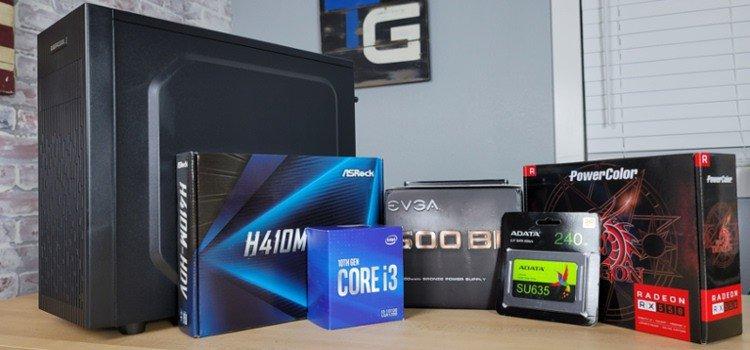
- CPU (Processor): This is often where you'll spend a significant portion of your budget. Look for an AMD Ryzen 5 2400G or Ryzen 3 3200G (used), or an Intel Core i5-6500 or i7-4770 (used). APUs (Accelerated Processing Units) with integrated graphics like the G-series Ryzen chips are excellent as they eliminate the immediate need for a discrete GPU, saving money.
- Motherboard: A compatible motherboard for your chosen CPU. For older Intel chips, an H110 or B150 chipset will do. For Ryzen APUs, a B450 board offers good value. Buying these used can save a lot.
- RAM (Memory): 8GB of DDR4 RAM is the minimum you should aim for. If your CPU uses integrated graphics, 16GB of DDR4 RAM running in dual-channel (two 8GB sticks) is highly recommended, as integrated graphics share system memory, and dual-channel significantly boosts performance.
- Storage: A 240GB or 500GB SSD (Solid State Drive) is crucial for faster boot times and game loading. Even a smaller SSD for the operating system and a few core games, coupled with a larger, slower HDD (Hard Disk Drive) for other files, is a viable option if storage space becomes an issue. New 2.5-inch SATA SSDs are quite affordable now.
- GPU (Graphics Card): This is the trickiest part. If using an APU, you might skip a discrete GPU initially. If you find a good deal, look for used cards like an NVIDIA GTX 970, GTX 1050 Ti, or AMD RX 570. These cards, while older, still offer decent 1080p performance for many games at lower settings.
- Power Supply (PSU): Don't skimp here. A reliable 400-500W 80 Plus Bronze certified PSU from a reputable brand (EVGA, Corsair, Seasonic) is essential for stability and future upgrades. A used quality PSU is better than a new cheap one.
- Case: Any functional ATX or Micro-ATX case will do. Aesthetics are secondary to airflow and compatibility at this price point. Used cases are a great way to save money.
Where Can I Find the Best Deals for a 400 Gaming PC?
Finding deals for a gaming PC for 400 dollars involves looking beyond new retail prices. Here are your best hunting grounds:
- Used Marketplaces: Websites like eBay, Facebook Marketplace, and local classifieds (Craigslist) are goldmines for components. Be diligent in checking seller ratings, asking for benchmarks or proof of functionality, and meeting in safe public places for local pickups.
- Refurbished Retailers: Companies that specialize in refurbished electronics, sometimes even directly from manufacturers, offer tested and warrantied components at a discount. Sites like Newegg's refurbished section or Micro Center's open-box deals are worth exploring.
- Pre-built Used Systems: Often, you can find entire used systems for sale that just need a minor upgrade (like adding an SSD or more RAM) to become a capable gaming PC. Look for office PCs with older Intel i5/i7 CPUs that can be paired with a cheap discrete GPU.
- Local PC Shops: Smaller, independent computer stores sometimes have used parts or can put together budget systems from surplus components.
- Flash Sales & Bundles: Keep an eye on major online retailers during sales events. Sometimes, a CPU/motherboard bundle or a RAM deal can significantly lower your overall cost. Patience is key when hunting for deals.
What Games Can I Realistically Play on a 400 Gaming PC in 2026?
You'd be surprised at the wide array of games a 400 gaming PC can handle, especially considering current gaming trends. US gamers around 36 often seek relaxation and social interaction, which many of these titles provide:
- Esports Titles: Valorant, Counter-Strike 2, League of Legends, Dota 2, Rocket League, Apex Legends (lower settings) run well. These are highly optimized for a wide range of hardware and represent a significant portion of social gaming.
- Free-to-Play (F2P) Games: Genshin Impact, Warframe, Path of Exile, Honkai Star Rail, and older versions of Call of Duty Warzone will be playable at lower settings. The F2P market is huge in 2026, offering endless hours of content without initial investment.
- Indie Games: Almost any indie game will run fantastically. Think Stardew Valley, Hades, Hollow Knight, Among Us, Valheim, or the recently popular cozy game Palia. Many of these offer deep experiences and are perfect for unwinding.
- Older AAA Titles: Grand Theft Auto V, The Witcher 3 (at lower settings), Skyrim, Fallout 4, DOOM (2016), and many titles from a few generations ago offer incredible value and run smoothly.
- Social & Cross-play: Games like Minecraft, Roblox, and many mobile-originated titles (played via emulators or PC versions) that offer cross-play are also excellent choices, facilitating connection with friends regardless of their platform.
The key is managing expectations and understanding that a gaming PC for 400 dollars is about smart choices, not graphical extravagance.
How Can I Maximize Performance on a Budget Gaming PC?
Once you've built your gaming PC for 400 dollars, there are several ways to squeeze out every bit of performance:
- Update Drivers: Always keep your GPU drivers (NVIDIA, AMD) and chipset drivers up to date. This can provide significant performance boosts and stability improvements.
- Optimize In-Game Settings: Lower resolution (720p or 900p instead of 1080p), turn off demanding visual effects like shadows, anti-aliasing, and post-processing. Experiment to find the sweet spot between visuals and frame rate.
- Close Background Apps: Before launching a game, close unnecessary applications running in the background (web browsers, Discord if not actively using voice chat, streaming services).
- Overclock (Carefully): If your components (especially RAM and some CPUs/APUs) support it, a modest overclock can yield a few extra frames. Do your research and proceed with caution, ensuring adequate cooling.
- Upgrade RAM: If you started with 8GB, upgrading to 16GB, especially if you have an APU, is one of the most impactful upgrades for general system responsiveness and gaming performance. Ensure it's dual-channel.
- Keep Storage Clean: Ensure your SSD has at least 15-20% free space for optimal performance. Regularly delete old games or files you don't need.
Is Building a 400 PC Better Than Buying a Used Pre-Built System?
Both building a gaming PC for 400 dollars and buying a used pre-built system have their pros and cons. The best approach depends on your comfort level and priorities.
Building Your Own:
- Pros: You learn about components, get exactly what you want, often achieve better performance per dollar by cherry-picking deals, and have more upgrade flexibility down the line. It's a rewarding experience for those who enjoy tinkering.
- Cons: Requires time, research, and technical knowledge. Troubleshooting issues can be challenging, and there's no single warranty for the whole system.
Buying a Used Pre-Built:
- Pros: Convenience, often cheaper for the initial setup, sometimes comes with an operating system. You might find great deals on older office PCs that just need a GPU upgrade.
- Cons: Less control over individual component quality, potential for hidden issues, limited upgrade paths, and previous owner's usage history is unknown. Often, the power supply or motherboard might be proprietary, limiting future changes.
For a 400 gaming PC, building piece-by-piece from used parts often gives you the best performance and upgrade path. However, a meticulously chosen used pre-built from a reputable seller can be a quicker entry point. Many gamers who balance work and life appreciate the convenience of a pre-built but value the optimization potential of a custom build.
What are the Biggest Pitfalls to Avoid When Building on a 400 Budget?
Navigating a tight budget for a gaming PC means being smart about avoiding common traps:
- Overspending on the GPU: It's tempting to put half your budget into a GPU, but if your CPU or RAM can't keep up, that powerful GPU will be bottlenecked. A balanced system is crucial.
- Cheap Power Supply: A generic, unrated PSU is a ticking time bomb. It can fail spectacularly, taking other components with it. Always invest in a reputable brand with an 80 Plus rating, even if it's used.
- Ignoring SSD: Relying solely on an HDD for your OS and games will lead to frustratingly slow load times and overall system sluggishness. An SSD is non-negotiable for modern gaming and general PC use.
- Incompatible Parts: Double-check CPU socket type, RAM generation (DDR3 vs. DDR4), and motherboard compatibility before buying. A simple oversight can lead to unusable components.
- Lack of Research for Used Parts: Don't buy used without verification. Ask for photos, serial numbers, and even video proof of functionality. Be wary of deals that seem too good to be true.
- Forgetting Peripherals: A gaming PC for 400 dollars often means the budget is *just* for the tower. Factor in a monitor, keyboard, mouse, and headset if you don't already have them. Basic used peripherals can often be found cheaply.
What are Smart Upgrade Paths for a 400 Gaming PC?
Building a budget PC often means thinking about future upgrades. Here's a sensible path for a 400 gaming PC:
- RAM Upgrade: If you start with 8GB, moving to 16GB of faster DDR4 RAM (in dual-channel) is often the first and most impactful upgrade, especially for APU users. This directly impacts multitasking and game performance.
- Dedicated GPU: If you started with an APU, adding a dedicated graphics card like a used RX 580, GTX 1070, or even a newer entry-level card like an RX 6600 (when prices drop further or used deals emerge) will transform your gaming experience.
- Storage Expansion: A larger SSD or adding a secondary HDD will give you more space for your growing game library and media files.
- CPU Upgrade: If your motherboard supports it (e.g., AM4 socket allows for Ryzen 3000/5000 series upgrades), a more powerful CPU can extend the life and capability of your system.
- Monitor: Upgrading from a basic 1080p 60Hz monitor to a 144Hz model can make a huge difference in the fluidity of games, even if you're not hitting 144+ FPS constantly.
Each upgrade should be strategic, addressing the current bottleneck of your system, ensuring your gaming PC for 400 dollars evolves effectively.
So, there you have it! Building a gaming PC for 400 dollars in 2026 isn't just possible; it's a smart move for many gamers balancing life's demands with their passion. By focusing on value, smart component choices, and leveraging the used market, you can absolutely create a capable machine that lets you unwind, connect with friends, and enjoy a vast array of games. Remember, it's about the fun and the experience, not just the specs. Keep those drivers updated, optimize your settings, and most importantly, have a blast.
What's your biggest gaming challenge when it comes to budget builds? Comment below!
FAQ Section: Gaming PC for 400
Is a gaming PC for 400 good for Fortnite? Yes, a well-optimized 400 dollar gaming PC can run Fortnite smoothly at 1080p on competitive (low) settings, achieving playable frame rates for enjoyable gameplay. Prioritize a capable used CPU with integrated graphics or an older discrete GPU like a GTX 1050 Ti or RX 570, coupled with 16GB of dual-channel RAM.
Can I stream with a 400 gaming PC? Streaming demanding games might be challenging on a 400 gaming PC, but lighter titles like Minecraft or older esports can be streamed with careful optimization. Use CPU-based encoding if your graphics card isn't powerful enough, and prioritize a quad-core CPU with hyper-threading (like an older i7 or Ryzen 5). Lowering stream quality will help.
What are the best CPUs for a 400 gaming PC? For a 400 gaming PC, the best CPUs are often used AMD Ryzen APUs like the Ryzen 5 2400G or Ryzen 3 3200G if you're relying on integrated graphics. If pairing with a used GPU, an older Intel Core i5-6500, i7-4770, or an AMD Ryzen 5 1600 offers great value and sufficient processing power for gaming.
How much RAM do I need for a 400 gaming PC? For a 400 gaming PC, 8GB of DDR4 RAM is the absolute minimum, but 16GB of DDR4 RAM is highly recommended, especially if you're using integrated graphics. Running RAM in dual-channel configuration (e.g., two 8GB sticks) significantly boosts performance, particularly for APUs, ensuring smoother gameplay and better multitasking.
Should I buy a new or used power supply for a budget build? For a 400 gaming PC, it is generally safer to buy a new, reputable brand 80 Plus Bronze certified power supply, even if it means slightly compromising elsewhere. However, if you find a used unit from a top-tier brand (like Corsair, Seasonic, EVGA) with good reviews and a guarantee from a trusted seller, it can be a cost-effective option. Never cheap out on the PSU.
What kind of monitor do I need for a 400 gaming PC? For a 400 gaming PC, a basic 1080p 60Hz monitor is perfectly adequate and can often be found used or on sale for under 100 dollars. Focus on a monitor with decent response time (around 5ms or less) and an IPS panel for better colors if possible. Don't allocate too much of your budget here initially.
Building a gaming PC for 400 dollars is challenging but achievable for playing light esports and older titles. Prioritize a capable CPU with integrated graphics or a used entry-level GPU. Look for refurbished parts, bundle deals, and consider older generations for value. Expect to play at 720p or 1080p on low to medium settings. Future upgradeability is crucial. Many popular social and free-to-play games run well. Smart component selection like a good power supply and enough RAM ensures stability and longevity.
35

6 Best Gaming PCs Under 400 In 2026 News Fb Image 8918 . Best Gaming PC Under 400 Update 06 2026 Best Gaming Pc Under 400 Img . Best Gaming PC Under 400 Update 06 2026 Best Gaming Pc Under 400 Img . BEST 400 Gaming PC You Can Build In 2026 YouTube . Top 10 Best Desktop Computers 2026 For Home Office And Work Lenovo Legion Tower 7i 2026 High Performance Desktop Computer With RGB Lighting Featured In



A Very Repeatable 400 Gaming PC Build Guide YouTube . 400 Gaming PC Build Guide YouTube . 6 Best Gaming PCs Under 400 In 2026 Best Gaming Pc Under 400 Top 3 . Best Gaming PC Under 400 For 2026 Updated For February NSX GAMING 5600G Desktop PC 1026x1200 . Best Gaming PC Builds For 2026 Best Gaming PC Builds For 2026.webp




Best 400 Budget Gaming Pc Build At Dominic Nanya Blog . PC Project 2026 Where To Start With Building Your Own Gaming PC CCL CCL 667 BLOG BUILD GUIDE 1980x1080 . PC Gaming 400 Euro Giugno 2026 Davvero Possibile La Verit PC Pc Gaming 400 Euro . Best Gaming Desktop For 600 Best Gaming Desktops . Best Gaming PC For Under 500 In 2026 Exp Gaming PC Guru Best Micro Gaming Pc With Rtx 4090 Featured 400x250


Best Gaming PC Under 400 For 2026 Updated For February 2 768x512 . Quale PC Gaming Scegliere Nel 2026 Zendia Zendia Pc Gaming Blog Cb70d7a7 6556 4c25 A230 . Our Best Cheap Gaming PC Under 400 In 2026 Best Cheap Gaming PC Under 400 . The Best Budget Gaming PC Build For 400 In 2026 PC Game Haven Best Budget Gaming Pc Build 400 Dollars 1 . One Moment Please Best Gaming Pc For Under 500 Dollars Featured 400x250


Best 400 RTX 4060 Budget Gaming PC Build July 2023 YouTube . Best Budget Gaming PC Build 2026 Affordab Gaming PC Guru Best Itx Gaming Pc Build 2026 400x250 . Why Desktop PC Prices Are Rising In 2026 And How To Still Get A Good Deal New Year Desktop PC Deals 2026 Main . PC Gaming Vs Console Gaming Honest Pros And Cons In 2026 Gaming PC.webp. Best Gaming PC Under 400 Update 06 2026 Best Gaming Pc Under 400 Img

How Much Does It Cost To Build A Gaming PC In 2026 Full Budget Guide Low Cost PC For Gaming 768x402 . Best Budget Gaming PC Build 2026 Affordab Gaming PC Guru Best 5000 Gaming Pc Build 2026 400x250 . PC40 5 Gaming Pc 400k Ic . Best Gaming PC Under 50000 In March 2026. Chinese ESports Firm Worked With AMD On 1 000 Hz Gaming Monitor Primed

Best Gaming PC Under 400 For 2026 Updated For February Best Gaming PC Build Under 800 768x512 . Best Gaming PC Under 400 For 2026 Updated For February Best Gaming PC Build Under 3000 768x513 . Gaming Pc Under 400 At Lindy Rossi Blog . Build PC Stream Game 2026 C N C U H Nh Ra Sao Live M T Kh Ng Lag Build PC Stream Game 2026 Can Cau Hinh Ra Sao De Live Muot Khong Lag.webp. Best Budget Gaming PC Build In India For 2026 Affordable Rs 30 000 Best Budget Gaming PC Build In India For 2026 854x503